
Email Reply Assistant with Approval
Summarise incoming emails and generate professional reply drafts for review, with the option to automate sending from your chosen Gmail or Outlook account.
- Quickly review concise summaries and AI drafted replies for each new email
- Choose between manual approval or fully automated sending of responses
- Works with your preferred AI and email provider, including Gmail and Outlook
- OpenAI
- Claude
- Gemini
- OpenRouter
- Gmail
- Outlook
 OpenAI
 Claude
 Gemini
 OpenRouter
 Gmail
 Outlook
Streamline Your Email Response Process
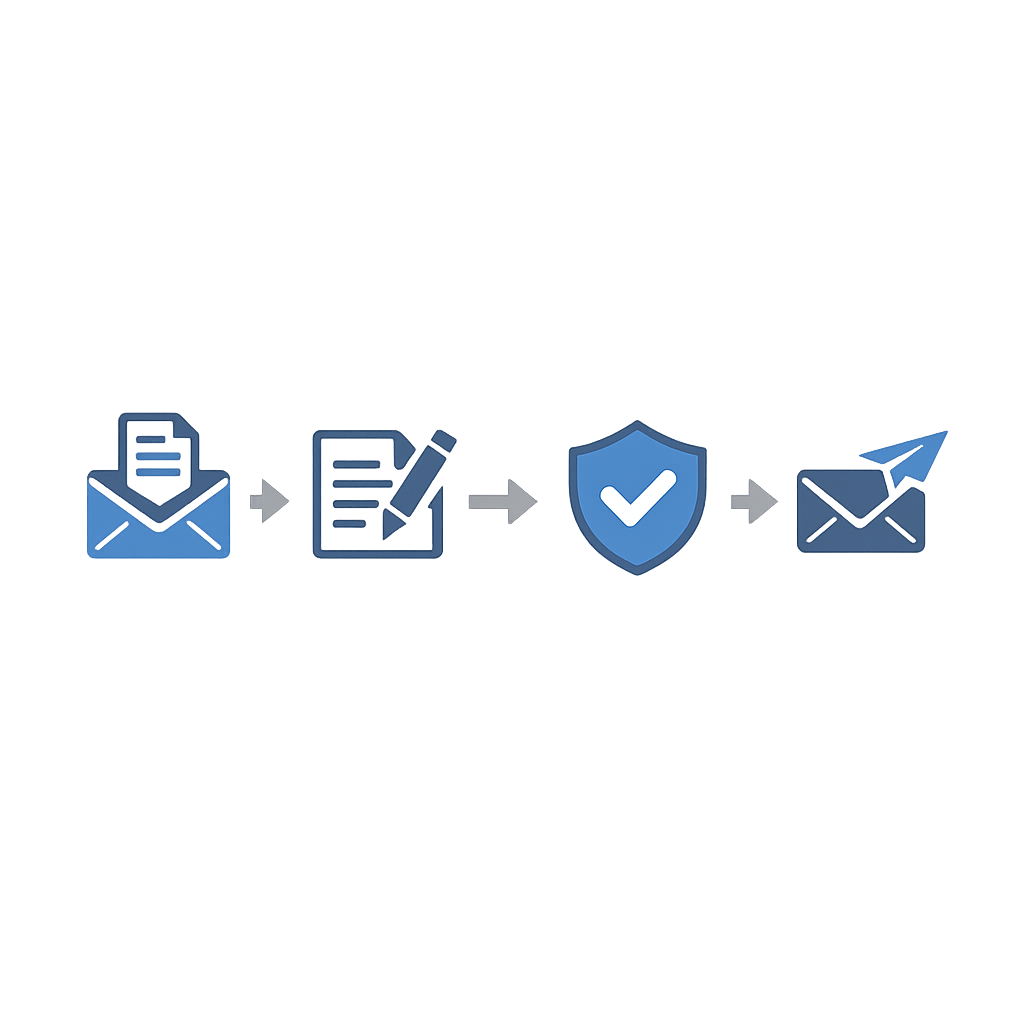
The Email Reply Assistant with Approval helps you manage your inbox by automatically summarising each new email and drafting a professional reply. You can review and approve each draft before sending, or enable automated sending if preferred. The solution integrates with your selected AI provider and email account, supporting both Gmail and Outlook, and can be started manually from your dashboard.
Automated Summaries and Drafts
Each new email is summarised and a reply draft is generated for your review.
Flexible Approval Options
Choose to review and approve replies before sending, or enable automatic sending for hands free operation.
Easy Integration with Leading Providers
Connect your preferred AI and email accounts, including Gmail and Outlook, with simple setup and switching options.
Key Features
Enhance your email workflow with automated summarisation and reply drafting, tailored to your chosen accounts and approval preferences.
 Email SummarisationEach incoming email is automatically summarised, allowing you to quickly understand the content at a glance.
 Professional Reply DraftsThe assistant generates a professional reply draft for every new email, ready for your review or immediate sending.
 Approval and Sending ControlDecide whether to review and approve drafts before sending or enable automatic sending for streamlined responses.
 Provider FlexibilitySelect and connect your preferred AI and email providers, with support for Gmail, Outlook, and leading AI platforms.
Runs
- Automatically, when new email arrives
- On demand, from your dashboard
Runs in the background — you are notified with the result.
From input to result
When activated, the assistant monitors your chosen email account, summarises each new message, drafts a reply, and either saves it for your approval or sends it automatically based on your settings.
Runs whenever you click Run once.
Accounts it connects to
The agent works inside your own accounts. You connect each one once during setup; credentials are never shown again after you save them.
- Works with OpenAI, Claude, Gemini or OpenRouter
- Works with Gmail or Outlook
- OpenAI, Claude, Gemini or OpenRouterRequired
Runs the AI steps on your account with the AI provider you choose (OpenAI, Claude, Gemini or OpenRouter).
You choose one during setup and connect only that account.
API key or token - Gmail or OutlookRequired
Reads and works on the mail in the mailbox you connect (Gmail or Microsoft Outlook).
You choose one during setup and connect only that account.
Sign in with your account
Before you start
Connect one AI provider account (OpenAI, Claude, Gemini, or OpenRouter) by entering your API key. Connect one email account (Gmail or Outlook) by signing in. Choose your preferred AI model and email provider. Set whether replies require your approval before sending.
What you'll set up
Settings you choose during setup. All of them can be changed later.
Settings
- AI provider
- Default: OpenAI
- Which AI account runs this agent. You connect only the provider you choose and can switch later without reinstalling.
- Email provider
- Default: Gmail
- Which mailbox the agent works with. You connect only the one you choose.
- Send without review · optional
- Default: No
- Off: replies are saved as drafts for you to check and send. On: the agent sends them itself.
Advanced settings (already set for you)
- AI model
- Default: recommended for your AI provider
- The model that writes the result (models of the chosen AI provider). If runs fail with a rate limit, choose a smaller model.
How each run starts
Nothing to type in: it works from your settings and the accounts you connect. A run starts:
- Automatically, when new email arrives in your inbox
- Whenever you press Run now in your dashboard
What you get back
{
  "sent": false,
  "action": "reply_drafted",
  "draftId": "r-396253282729988538798",
  "provider": "gmail",
  "messageId": "1a181e6f4b5fh636",
  "heldReason": "review_required",
  "recipients": [
    "[email protected]"
  ],
  "messagesSent": 0
}
Every run produces
- Result — What the agent did for this event (action, messages sent, job id).
Where you get it
- By email, from the Gmail or Outlook account you connect
- Every run, its status and its result in your dashboard run history
Simple, predictable pricing
Email Reply Assistant with Approval
Free
- Free plan: 1 agent, no card needed
- Use your own AI keys - no usage charges from us
- Plan
- Free, no card needed
- Maximum run time
- 1 min
- How it runs
- In the background
- Provider costs
- Billed by each provider to your own account
Common questions
Which email accounts can I connect?
You can connect either a Gmail or Microsoft Outlook account, choosing the one that best fits your needs.
Can I choose which AI provider is used?
Yes, you select one AI provider. OpenAI, Claude (Anthropic), Google Gemini, or OpenRouter when setting up the assistant and can switch later if needed.
Do I have to approve every reply before it is sent?
No, you can choose to review and approve drafts before sending, or enable automatic sending if you prefer.
Set up Email Reply Assistant with Approval in a few minutes
Connect your accounts, choose your settings, run a test, then switch it on.